quick summary
Build-Your-Own Pointr is live on Pointrs. Name your Pointr, add any flight or hotel you've found — even ones outside our 27,000+ existing Spend Less Pointrs — enter the loyalty programs and points/miles involved, and Pointrs shows you exactly how to book it, what percentage of the points you already have, and every way to earn the rest. Build up to 10 flights and hotels into one Pointr, and save it to come back to any time.
You have the trip in mind. Now what?
Maybe you've already found the exact flight or hotel you want. Or maybe you're still at the planning stage — you know where you want to go, roughly when you want to travel, and what you'd like to fly or stay in, but you haven't found the right option yet.
Either way, one of the biggest questions is the same: how many Qantas Points, Velocity Points, KrisFlyer Miles or Amex Membership Rewards points will you need — and do you have enough to make the trip happen?
You might want to:
- Check whether your current points and miles balance is enough for the trip you're planning.
- Work out how many more points or miles you need.
- See which loyalty programme or combination of programmes could get you there.
- Find out how to earn the additional points or miles you need.
- Track your progress towards your travel goal.
- Start with a specific flight or hotel you've already found and work backwards to figure out how to make it bookable with points.
- Or simply explore what's possible before you've decided on the exact flight or hotel.
It's one of the most common questions we hear: "I know where I want to go — but how do I know how many points I need, whether I have enough, and how do I earn the rest?"
Our 27,000+ Spend Less Pointrs already cover an enormous range of routes, airlines and hotels. But travel is personal, and sometimes the exact trip you're planning isn't one we've built yet.
Now you can build it yourself.
With Build Your Own Pointr, you can create a personalised points strategy around your own trip — whether you're starting with a destination, a travel goal, a specific flight or hotel, or simply the points and miles you already have.
Introducing Build-Your-Own Pointr
Build-Your-Own Pointr (BYO) lets you create your own personalised Spend Less-style Pointr from scratch, using the exact flight, hotel or combination you've found. No waiting for us to add it. No spreadsheets. No guesswork. It's live now, under Build-Your-Own in the main menu.
Here's what it does:
-
You enter the details. Add the flight, the hotel, or both — plus the loyalty programs involved and the number of points or miles required.
-
Pointrs builds your Flights/Hotels panel. Just like our existing Spend Less Pointrs, you'll see exactly how to use your points and miles to book it, and how to earn more if you're short.
-
You save it and revisit it any time. Your Build-Your-Own Pointrs live in your Dashboard, right alongside your Personal Pointrs, so you can track your progress toward booking.
It’s live now on Pointrs.
How it works, step by step
1. Name your Pointr
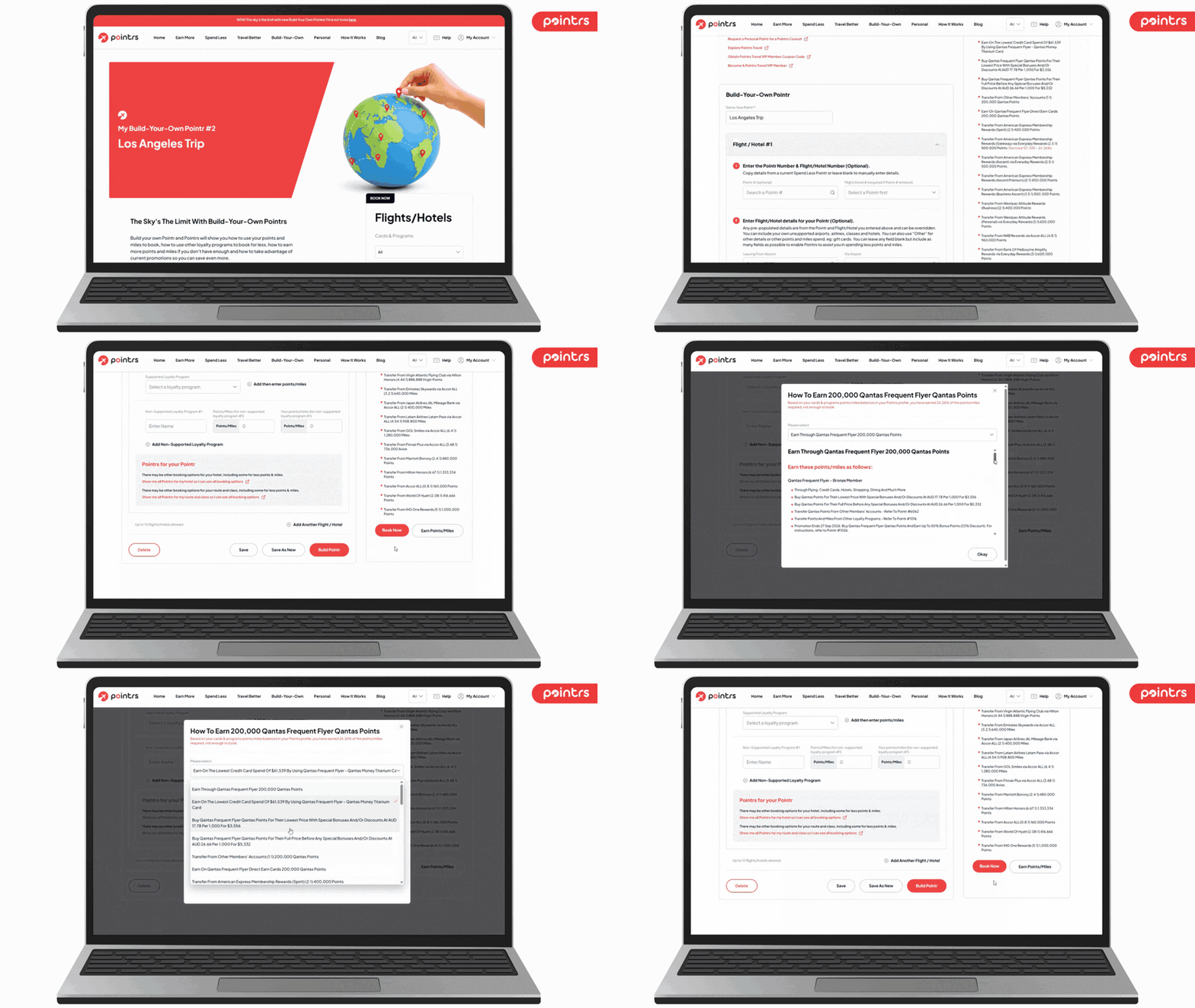
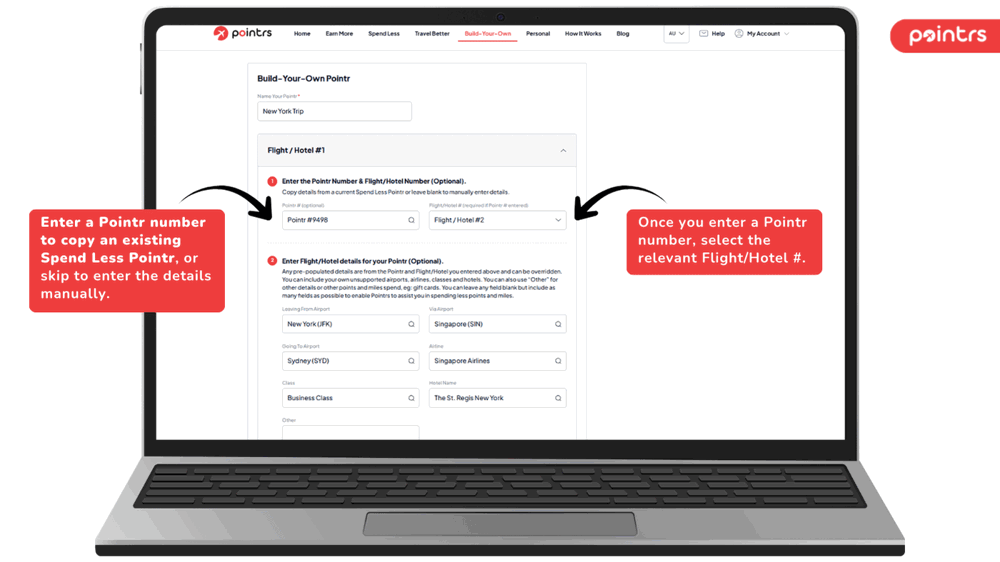
Every Build-Your-Own Pointr starts with a name — something like "New York Trip." It's how you'll find it again later, and it appears at the top of the page alongside its own Pointr number (your second one shows as "My Build-Your-Own Pointr #2," and so on).
2. Add a flight, a hotel, or both — or copy an existing Pointr
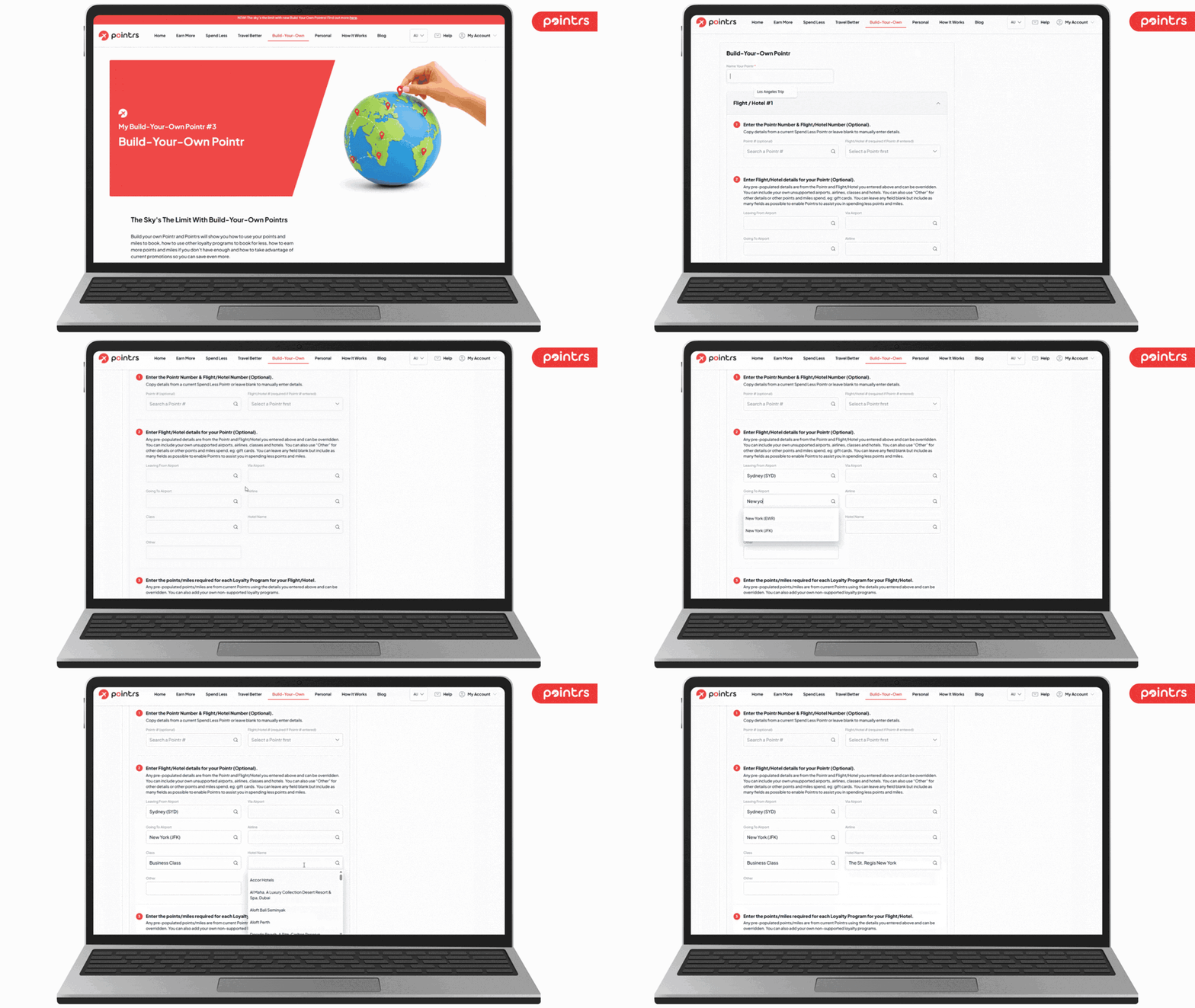
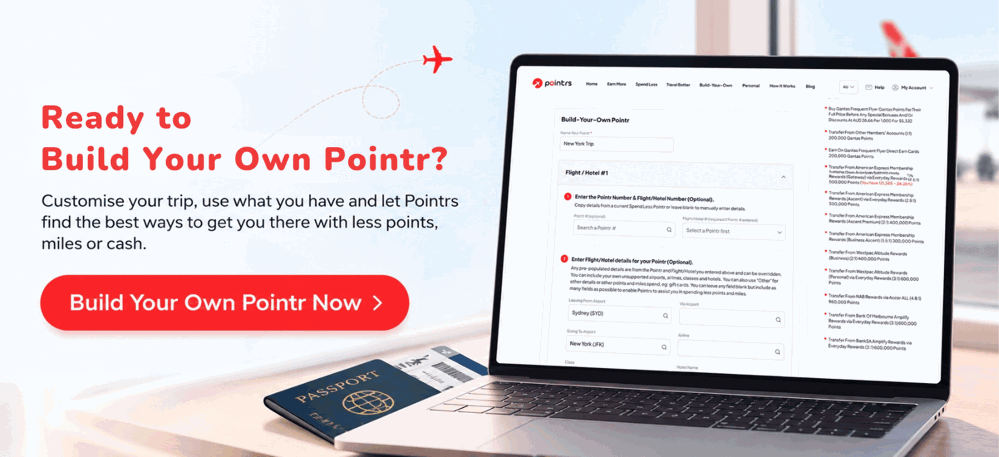
For your first Flight/Hotel, you can start from scratch or copy across the details from one of our 27,000+ Spend Less Pointrs by entering its Pointr Number and Flight/Hotel Number — handy if you just want to tweak an existing option. From there, fill in as much as you know: Leaving From Airport, Via Airport, Going To Airport, Airline, Class, Hotel Name, and an "Other" field for anything else — even non-flight, non-hotel spend like gift cards. Every field is optional, but the more you fill in, the more precisely Pointrs can help.
3. Add the loyalty programs and points required
Pick from Pointrs' supported loyalty programs, or add your own as a Non-Supported Loyalty Program with its own points/miles figure. Add as many as the booking involves.
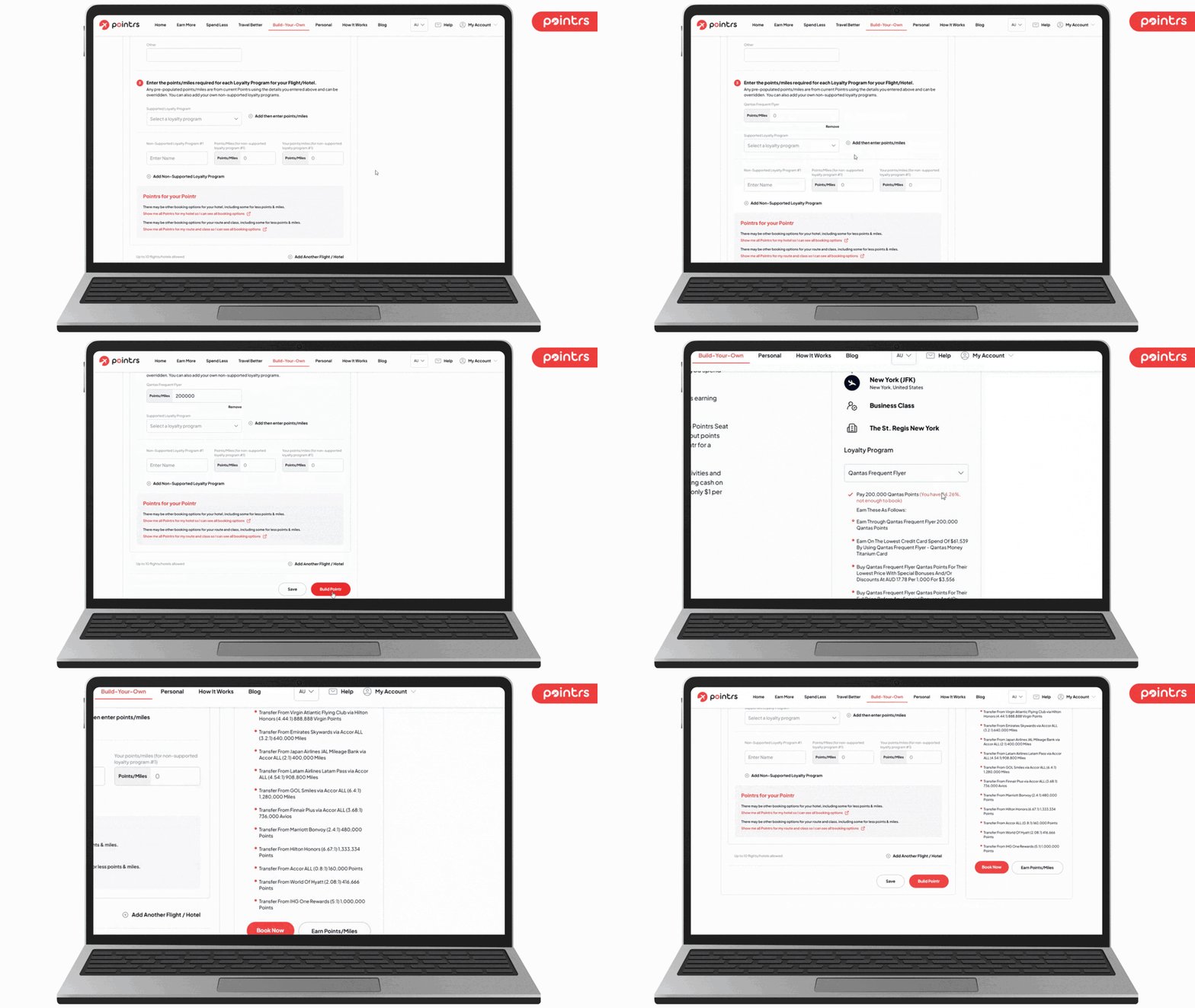
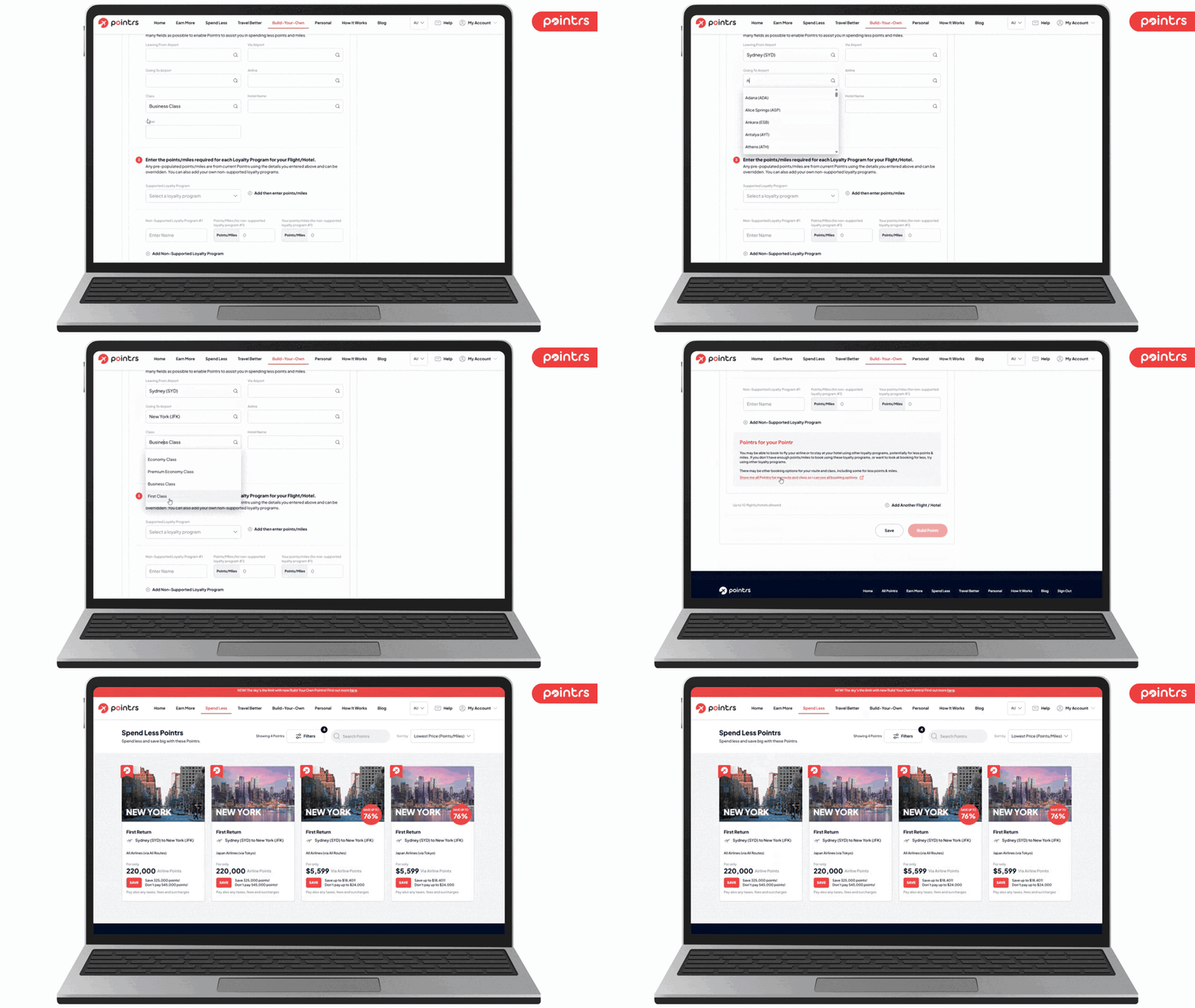
As you go, you'll see "Pointrs for your Pointr" tips — flagging if there's a way to book the same route, class or hotel through an existing Pointr for potentially fewer points and miles, with a direct link to see every booking option for that route, hotel, or route and class.
💡 Keep your points and miles balances up to date
Before building your Pointr, make sure your saved cards and loyalty programmes in your Dashboard have your latest points and miles balances. This helps Pointrs show how much of your trip you can already afford, how much more you need, and the different ways you can earn the rest. You can update your balances anytime under Card & Program Choices in your profile.
4. Build your full itinerary
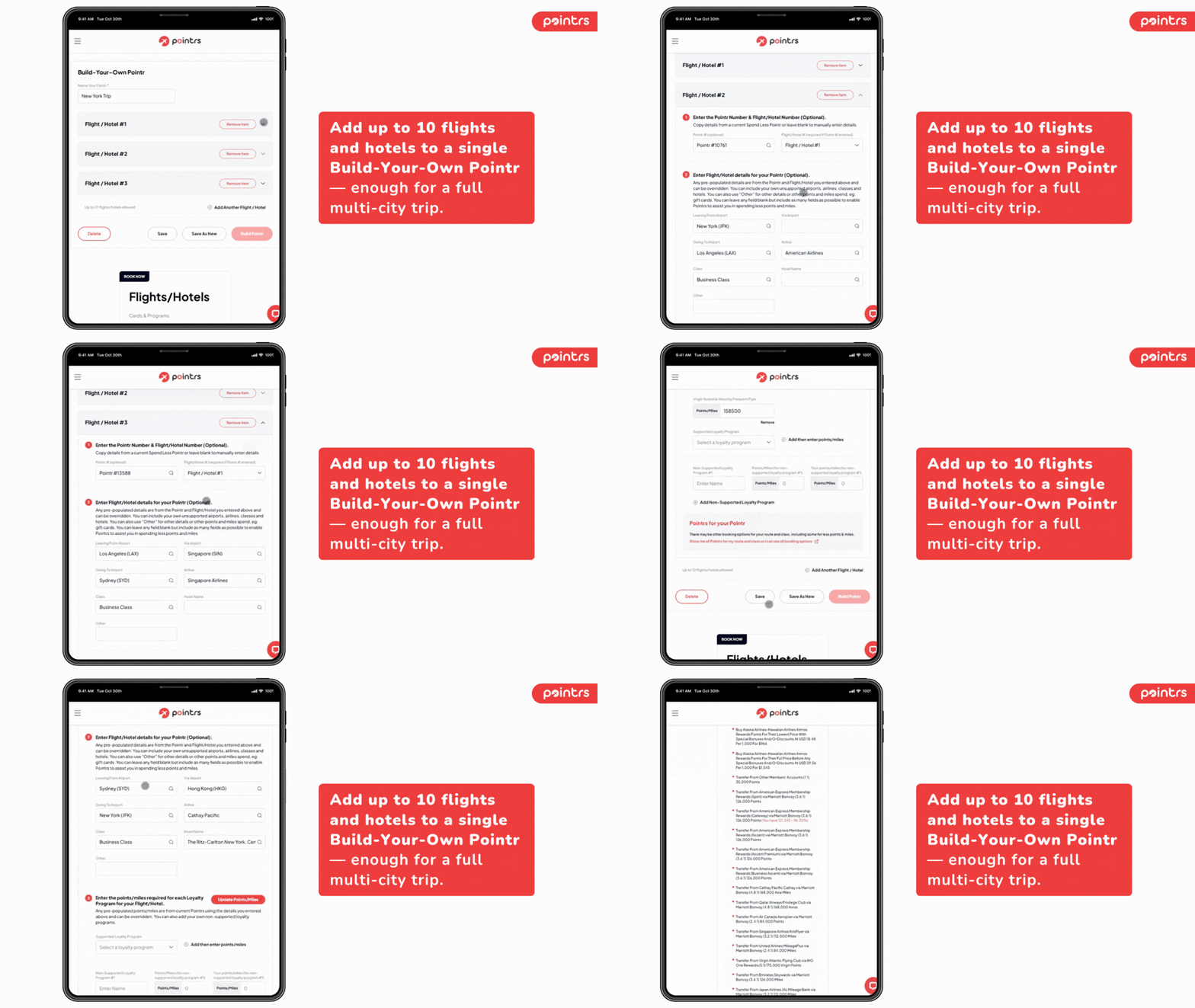
Add up to 10 flights and hotels to a single Build-Your-Own Pointr — enough for a full multi-city trip. Click Build Pointr when you're ready, or Save if you want to finish later.
5. See exactly what you can already afford — and how to earn the rest
This is where Build-Your-Own Pointr does the heavy lifting. Say you've built a Pointr for a Sydney to New York flight in Business Class, plus a stay at The St. Regis New York, using Qantas Frequent Flyer. Your Flights/Hotels results show:
- Pay 200,000 Qantas Points — and exactly what percentage of that you already have, based on your saved cards and loyalty programs (in this example, 24.26%, not yet enough to book)
- Earn these as follows — every way to close the gap: the credit card spend that gets you there, the price to buy the points outright, and every loyalty program you can transfer from, down to the exact transfer ratio — from American Express Membership Rewards and Westpac Altitude Rewards to Marriott Bonvoy, Hilton Honors, and dozens more
From there, click Book Now to go ahead, or Earn Points/Miles to start closing the gap.
One panel for your whole itinerary
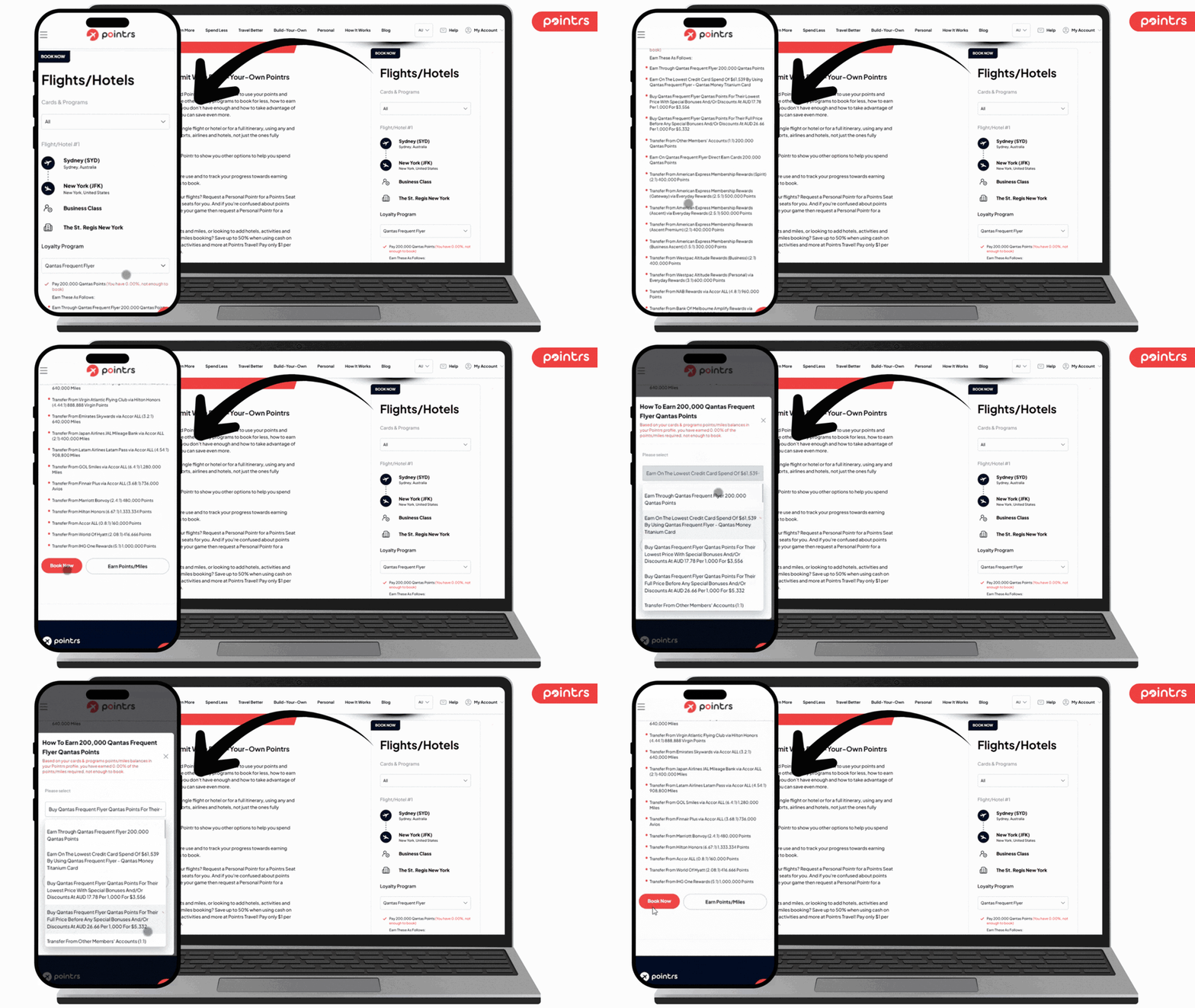
The results panel is called Flights/Hotels for a reason — flight and hotel results sit together, with the airline for every flight and the hotel for every stay visible at a glance, so a combined itinerary reads as one trip, not a list of separate bookings.
How Build-Your-Own Pointr fits with the rest of Pointrs
Build-Your-Own Pointr doesn't replace anything — it fills the one gap in our existing lineup: what to do when you've found something we haven't built yet.
- Earn More Pointrs shows you how to earn up to 3.5x more points and miles on everyday spending — the same earning logic Build-Your-Own Pointr uses to show you how to top up for your specific booking.
- Spend Less Pointrs already covers 27,000+ ways to save up to 75% on flights and hotels. Build-Your-Own Pointr extends that same booking guidance to any flight or hotel you find that isn't in our database yet.
- Travel Better Pointrs helps you secure the best seats and perks once you know how to book.
- Personal Pointrs is our concierge service — request a Personal Pointr for a Pointrs Seat Search or a Pointrs Consult, and our team does the searching for you. Build-Your-Own Pointr is the self-serve, instant version: perfect when you already know exactly what you want.
- Pointrs Travel is there for when points don't make sense — save up to 50% using cash on over 3,000,000 hotels, activities and more, for $1/year VIP membership.
- Your saved cards and loyalty programs are what power the whole thing. Keep them up to date, and Build-Your-Own Pointr — like every other Pointrs feature — will tell you exactly what you can already afford. See how this works in How Pointrs Works and our recent update on personalising your Pointrs experience.
Frequently asked questions
Can I copy an existing Spend Less Pointr into my own Build-Your-Own Pointr? Yes. Enter its Pointr Number and Flight/Hotel Number in step one and the details will pre-fill — you can then override anything you like.
What if my airline, hotel or loyalty program isn't one Pointrs already supports? You can still add it. Leave the Pointr Number blank and enter your own airport, airline, class or hotel details manually, and add any loyalty program as a Non-Supported Loyalty Program with your own points/miles figure.
How is Build-Your-Own Pointr different from Personal Pointrs? Personal Pointrs is our concierge service — you request a Pointrs Seat Search or a Pointrs Consult and our team does the searching for you. Build-Your-Own Pointr is self-serve: you enter the details yourself and get an instant, personalised breakdown of how to book and earn.
Can I save my Build-Your-Own Pointr and come back to it later? Yes. Click Save to keep your progress, or Build Pointr to see your results — either way, it's kept under its own name and Pointr number so you can find it again.
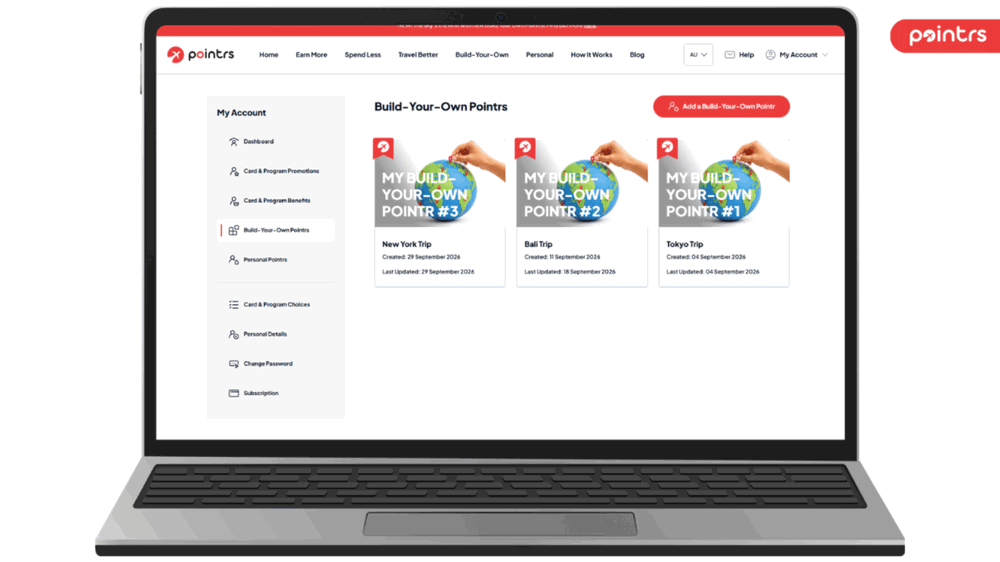 Revisit your BYO Pointr from your dashboard
Can't find a reward seat? Try Pointrs Seat Radar
Pointrs Seat Radar searches selected routes and dates for available reward seats across multiple airlines and loyalty programmes — so you don't have to. We focus on peak travel periods, major events, school holidays and last-minute getaways.
Best of all, it's completely free. Look for the Seat Search banner on relevant Spend Less Pointrs to see available reward seats.
Need a specific search?
If your dates or route aren't covered by Seat Radar, Pointrs Seat Search lets our team search for reward seats based on your exact travel preferences across multiple airlines and programmes.
Searches are available for just $9.99.
Ready to build your own Pointr?
Build-Your-Own Pointr is live right now for all subscribers. Here's how to get started:
- Log in to your Pointrs account and open Build-Your-Own from the main menu.
- Name your Pointr, add your first flight or hotel, and click Build Pointr.
- Make sure your saved cards and loyalty programs are up to date (see How Pointrs Works) so your results show exactly what you can already afford.
- Not a subscriber yet? Sign up free and build your first Pointr today.
Prefer to have someone else do the searching? Request a Personal Pointr for a Pointrs Consult and let our team find your best options.