Two New Pointrs Features Just Made Finding Reward Seats (and Points) Easier
Quick Summary
We've rolled out two upgrades to make your Pointrs experience faster and clearer. First, Seat Search Results now show up in an easy-to-read calendar format, so you can see exactly how many seats are available on which dates — no more guesswork. Second, Earn Points/Miles options now appear directly under your flight results, so you can compare loyalty programs at a glance before diving into the details. Both features are live now on Pointrs.
Why These Updates Matter
Finding the right reward seat shouldn't feel like a second job. Between checking seat availability, comparing transfer ratios across a dozen loyalty programs, and working out which card or points balance gets you there fastest — it's a lot to juggle. These two updates are built to cut that effort down, so you can spend less time cross-checking tabs and more time booking your next trip.
Feature 1: Seat Search Results, Now in a Format That Actually Makes Sense
If you've ever requested a Pointrs Seat Search, you'll know how valuable it is to know real seat availability before you commit points. Now, that information is front and centre.
Once a Seat Search has been completed on a flight, you'll see it flagged directly on the results page with a line like "Seat Search Has Found 312 Seats", along with a new Seat Search Results button sitting right alongside Book Now and Earn Points/Miles.
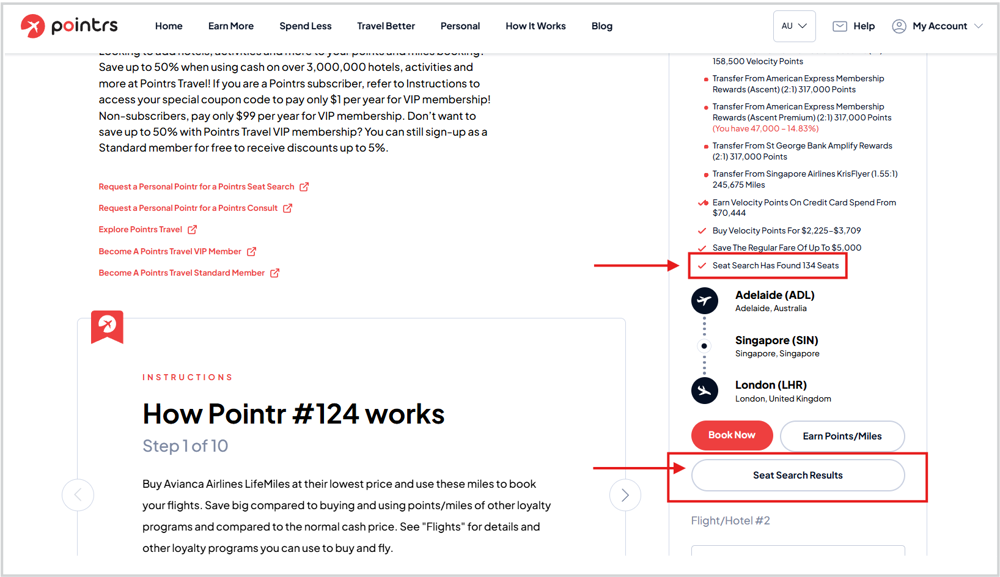
Click the "Seat Search Results" button, and you'll be taken to a clean, calendar-style breakdown showing:
-
The date the search was run
-
The search range covered (e.g. 1 Sep 2026 – 30 Nov 2026)
-
The number of seats requested
-
The loyalty program used for the search
-
A full calendar view, with the number of available seats shown on each date
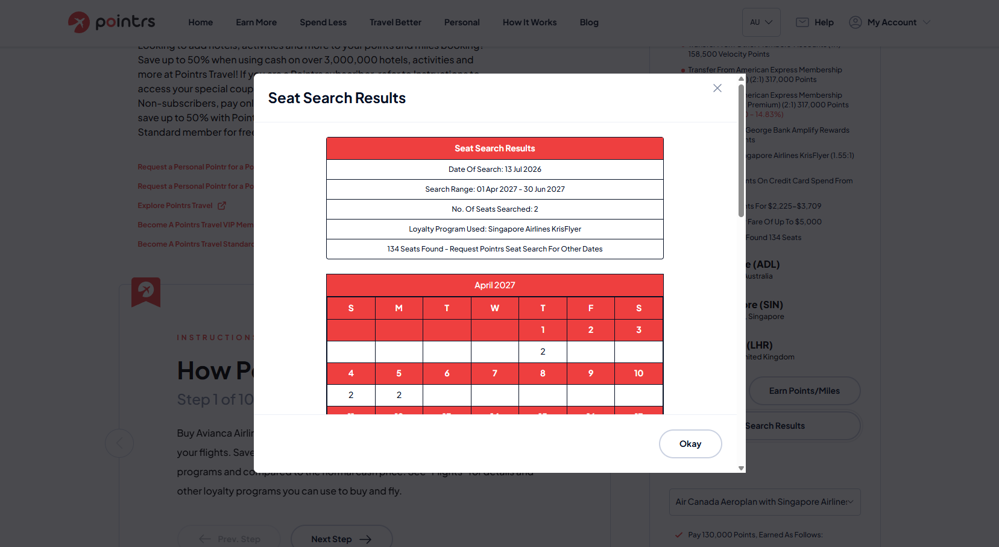
Instead of a wall of text, you get a visual snapshot of exactly when seats are open — so you can plan travel dates around real availability, not hope.
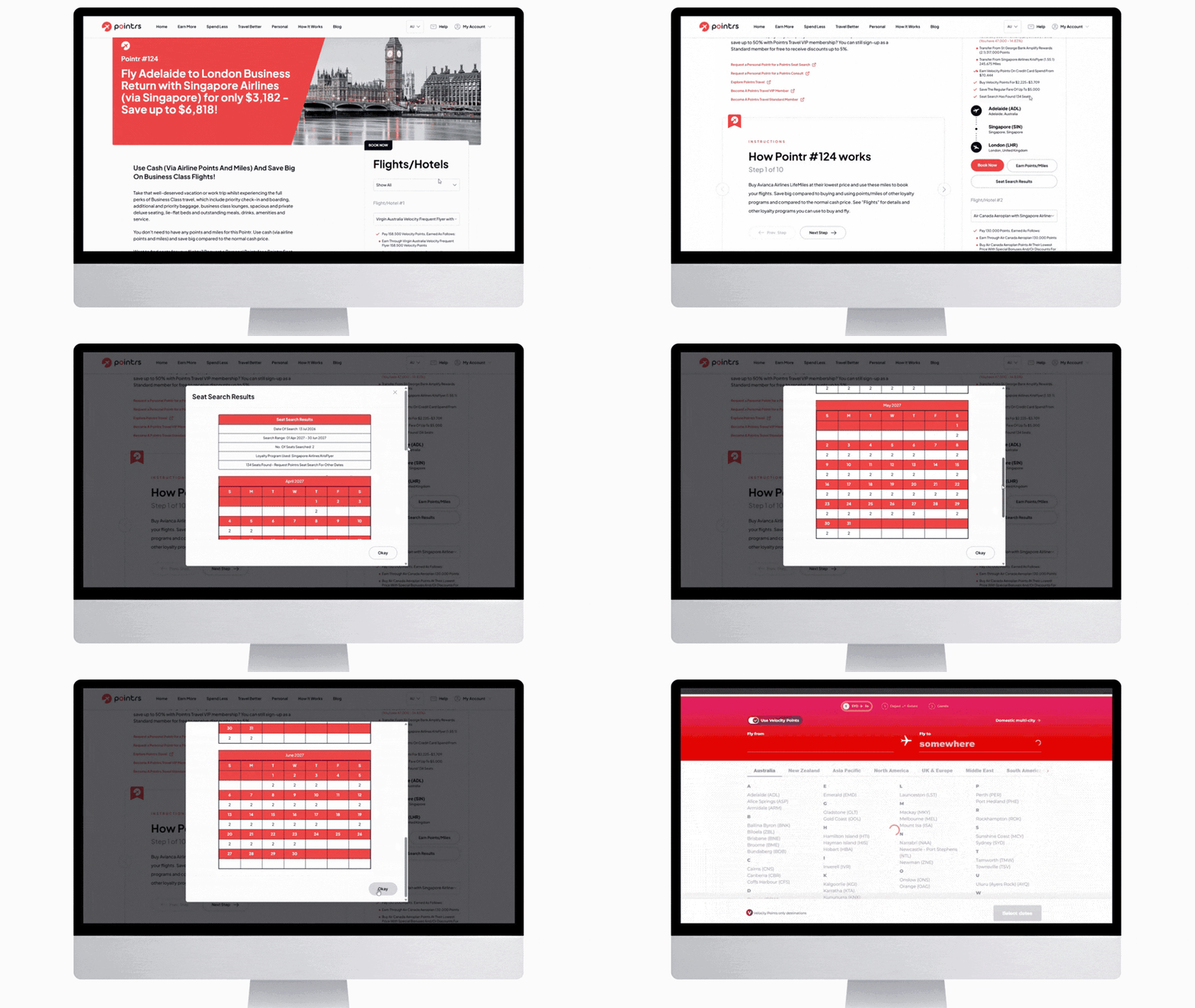
Don't have a Seat Search on file yet? You can request a Personal Pointr for a Seat Search and let the team do the digging for you.
Feature 2: Earn Points/Miles Options, Now Visible Under Every Flight
Previously, comparing how to earn the points needed for a flight meant clicking into "Earn Points/Miles" and reviewing the full list separately. It worked, but it added a step between you and the comparison you actually wanted to make.
Now, a summary of those same earn options appears directly under the flight listing itself — transfer partners, ratios, and what you currently hold, all visible without leaving the page. Want the full detail? "Earn Points/Miles" is still there for a deeper dive.
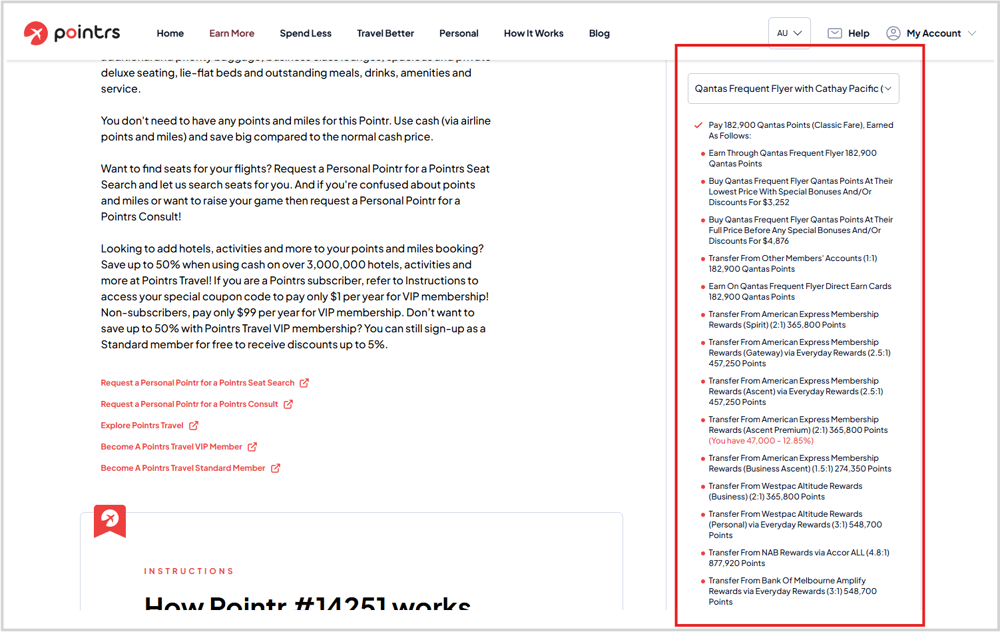
This might sound like a small tweak, but it changes how you shop for reward flights. You can now scan multiple loyalty programs side by side — comparing transfer ratios from programs like Amex Membership Rewards, NAB Rewards, or Alaska Airlines Atmos Rewards — and immediately see which path gets you to your seat with the least top-up needed. Better visibility, faster decisions, smarter points strategy.
Frequently Asked Questions
What is Seat Search Results on Pointrs? Seat Search Results is a feature that displays a calendar-style breakdown of confirmed seat availability for a flight, based on a completed Pointrs Seat Search. It shows the search date, date range, and number of seats available on each specific day.
How do I access Seat Search Results for my flight? If a Seat Search has already been run on a flight, you'll see a "Seat Search Has Found XX Seats" message and a Seat Search Results button on the flight page. Click the button to open the calendar view.
Can I compare earn options without clicking into a separate page? Yes. Earn Points/Miles options now show in summary form directly under the flight listing, so you can compare loyalty programs at a glance. Click "Earn Points/Miles" any time for the full detailed breakdown.
Do these features cost anything extra to use? No, both updates are available to all Pointrs users as part of the standard experience — no extra subscription or fee required.
Ready to see it in action? Explore Flights & Hotels on Pointrs and try a Seat Search on your next trip.

Not sure which loyalty program gives you the best value? Request a Personal Pointr for a Consult and we'll help you map out the smartest path to your next seat.